

- User ID
- 1
- Joined
- 7 Jan 2019
- Messages
- 1,768
- Reaction score
- 145
- Points
- 63
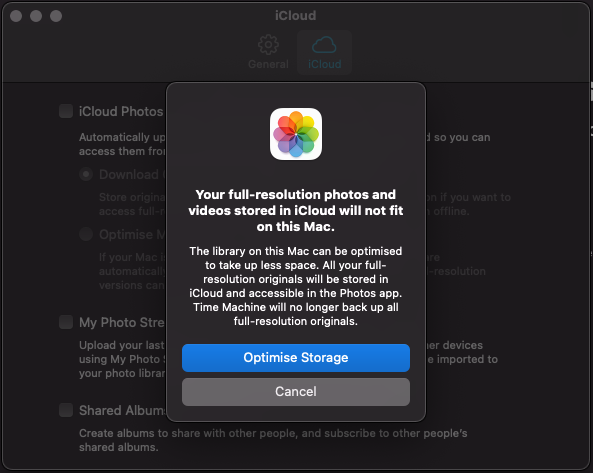
Suppose you already have iCloud enabled on another iPhone/iPad or macOS, and now you want to enable iCloud Photos on your Mac, and you get this error message:
Here's how to solve it:
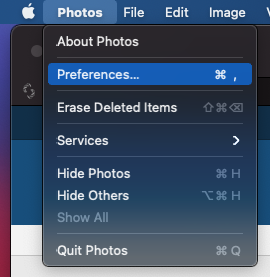
Launch the Photos app, and then click on the menu bar:
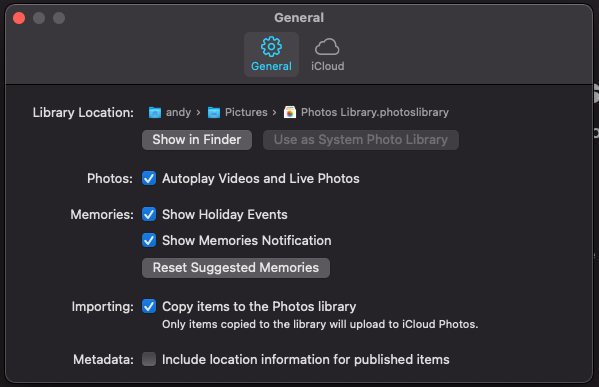
Enable iCloud Photo Library in this panel, and make sure
The option
Now we should be able to enable iCloud Photos (tick on the
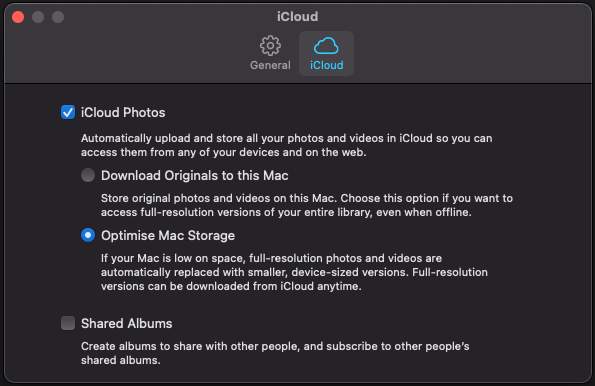
Now we have iCloud Photos enabled on your Mac.
Tested on: macOS Big Sur, version 11.5 (20G71)
If you have any questions or comments, you're more than welcome to post them down below
Could not estimate size of “Photos Library.photoslibrary”. iCloud Photos will not be enabled.
Here's how to solve it:
Launch the Photos app, and then click on the menu bar:
Photos -> Preferences... -> General.Enable iCloud Photo Library in this panel, and make sure
Use as System Photo Library is already enabled as well.The option
Use as System Photo Library should be grayed out.Now we should be able to enable iCloud Photos (tick on the
iCloud Photos), you can select Optimise Storage.Now we have iCloud Photos enabled on your Mac.
Tested on: macOS Big Sur, version 11.5 (20G71)
If you have any questions or comments, you're more than welcome to post them down below